Concrete and glass facade in soft light
Case study · Aiyarise Intelligence

Restoration call answering

Every call answered, captured and on the board

An AI phone line, dispatch board and crew app, built for a disaster restoration franchise whose 24/7 emergency line is the business.

Victoria, BCOctober 2026
In this case study

Four parts, one call

  1. 01The briefWhat an emergency line asks of an answering service
  2. 02The callName, address, the team alerted, then the rest
  3. 03The office and the crewFrom the phone to the board to the van
  4. 04Built to hold upIts limits, and why it can be trusted at 2 AM
Chapter 01

The brief

When water is coming in, the call is the job

  • 01Calls arrive at the worst times
  • 02Every question costs a caller
  • 03Urgent can never look routine
The situation

Three ways an emergency line loses jobs

Every one of them costs a job or an hour

Calls at the worst times

After hours, on weekends, in a storm, and while every crew is out on another site.

The costThe caller rings the next company on the list.

Thin messages

A name and a number the office has to chase, then retype into the job.

The costOffice hours go to chasing and retyping.

Urgent looks routine

An active loss can sit in an inbox until someone reads it hours later.

The costA crew rolls hours later than it could have.

The design principle

Path of least resistance.

The rule behind every question on the line

A caller standing in water hangs up at the first question that does not need answering.

Chapter 02

The call

Two questions, then the team is on it

  • 01Name and address first
  • 02The team alerted while the caller talks
  • 03Press 1 for a person, any time
The order

Two questions, then the team is notified

Then only what the crew needs before the callback

Name

Right after a short greeting that says it is automated.

Address

What is the address of the property?

Team alerted

Emailed on the spot; the caller is told only once it has gone.

On the line

What happened

In their own words. Urgency is read from the story.

Callback, claim

Yes or no on the number. No claim, no more insurance questions.

Readback

The core facts, an explicit yes, a reference number.

Show, don't claim

The opening of a call, typed out

An illustrative call with invented details

  • Two questions: the name, then the property address
  • The alert: sent before the caller is told it was
  • The way out: press 1 for a person, at any point
Restoration line · live call02:14
Incoming call · caller ID 555-555-0144
Agent: Larkspur Restoration, this is the automated assistant. Calls are transcribed. What’s your full name?
>Sarah Chen. Water is pouring through the basement ceiling.
Agent: I’m sorry, that sounds stressful. What’s the address of the property?
>4521 Cedar Lane, North End.
●update_intake name · address · active loss
✓Alert emailed to the office · accepted
Agent: Thanks, Sarah. I’ve notified our emergency team, and someone will call you shortly. If at any point you’d like to talk to a person, just press 1.
Prepared for review. A person decides.
The revision

Shorter by design

In the callFirst versionRevised
Questions before the caller hears the team is on it92
Questions when no insurance claim is open yet12 to 147
Insurance questions after the caller says “no claim”30
The callback numberRead back digit by digitConfirmed yes or no
The readbackThe caller’s whole storyCore facts only

Design facts from the October 2026 revision, made after the first test calls.

The readback

One summary, one yes

Nothing is saved until the caller confirms

  • Core facts only: who, where, the loss, the callback, the claim
  • An explicit yes: or the details are corrected first
  • A short reference: four digits the caller can hold onto
Readback02:58

Sarah Chen · 4521 Cedar Lane

LossWater damage, needs someone right away
CallbackThe number she is calling from
ClaimNo claim yet
Reference1 0 4 2
Saved on her yes. It lands in Needs review for the office.
Prepared for review. A person decides.
Chapter 03

The office and the crew

From the phone to the board to the van

  • 01Every call lands in Needs review
  • 02The team hears first
  • 03Every stage, live on the board
The board

Every call lands in Needs review

Nothing reaches a crew until a person releases it

  • At a glance: live calls, needs review, available, in the field
  • Per job: the caller, the property, the loss and who has it
  • Crew memos: notes from the field, in one place
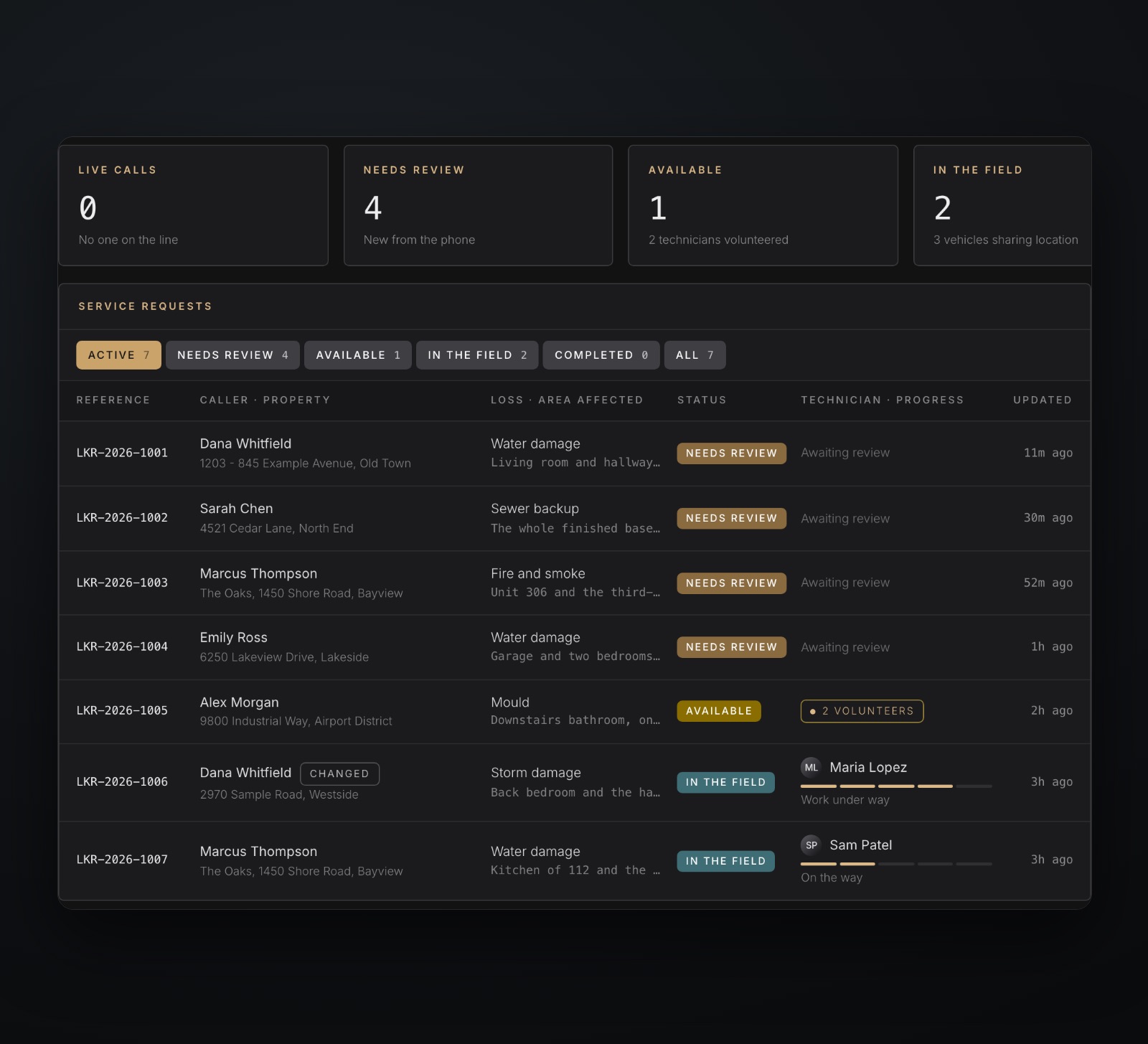
The dispatch board: counts for live calls, needs review, available and in the field, and a list of service requests with status and technician progressIllustrative · sample data
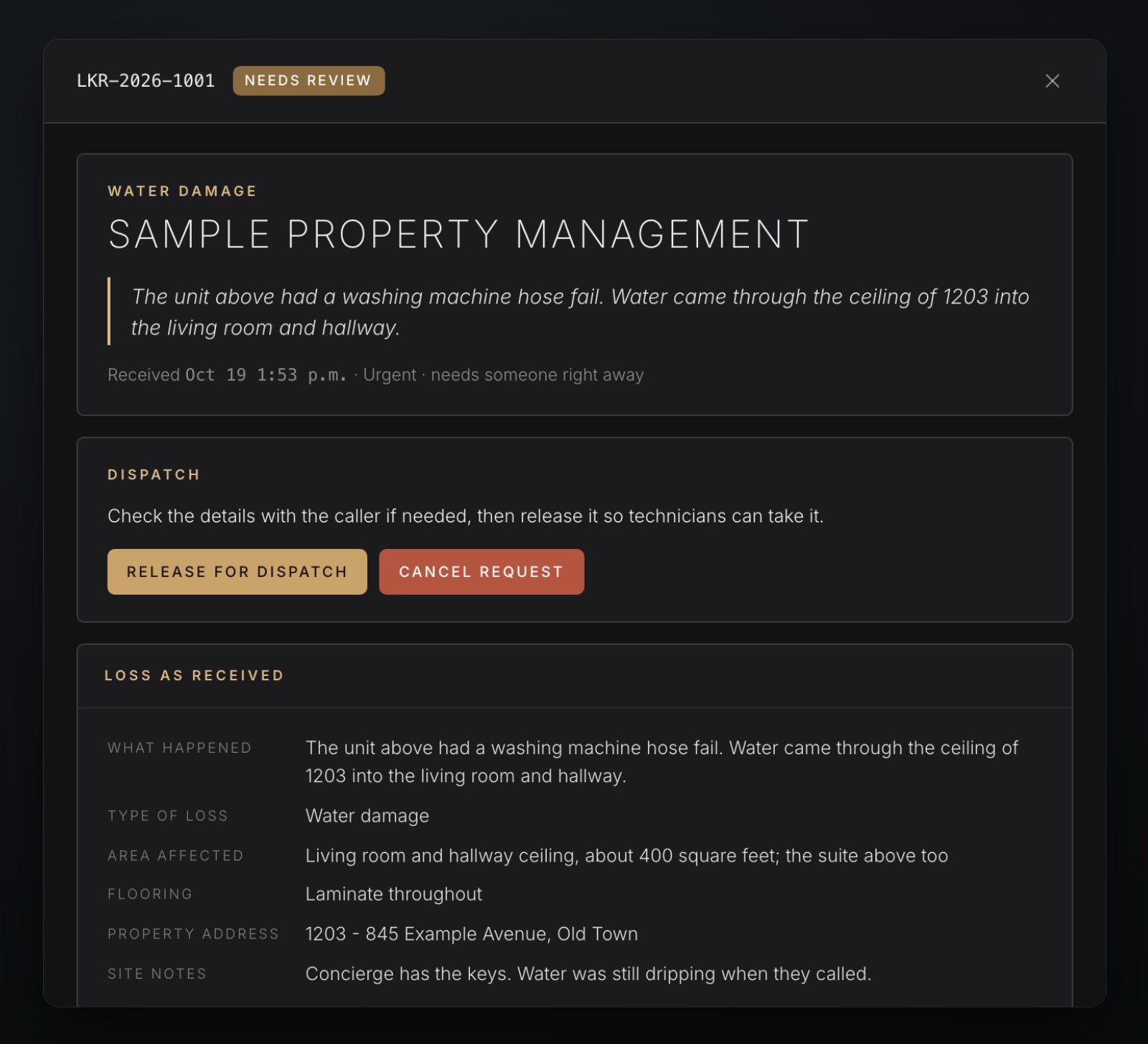
A job record: the caller’s words, a Release for dispatch button and the loss as receivedIllustrative · sample data
The record

One finished record per call

Checked, then released in one press

  • The caller’s words: what happened, as they said it
  • The loss as received: type, area, flooring, site notes
  • Flags: active loss, no claim yet, team alerted
  • The transcript: every word, on record
The office email

The team hears first

An alert during the call, the full form after it

  • During the call: an alert the moment there is a name and an address
  • After every call: the intake form and the transcript, even for a hang-up
  • Print-ready: the form arrives as a Letter PDF
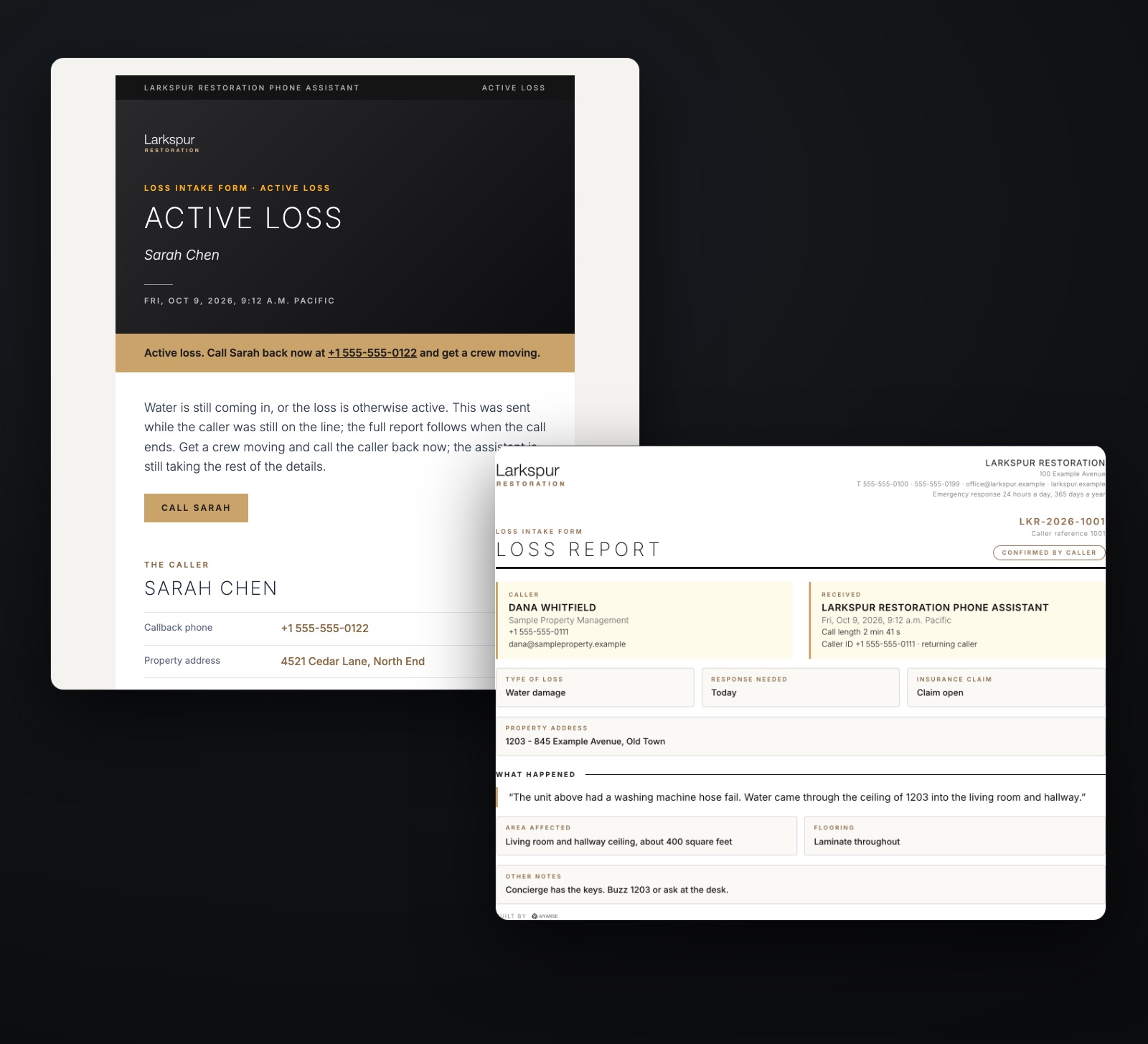
An active loss alert email beside the loss intake formIllustrative · sample data
The crew app

Every stage, live on the board

Technicians move the job; the office watches it move

Released
Available

The office releases the job to the crews.

Claimed
Assigned

A technician volunteers; the office approves or assigns.

En route
On the way

Directions and the customer’s number, now theirs.

On site
Work under way

A spoken site report, laid beside the phone report.

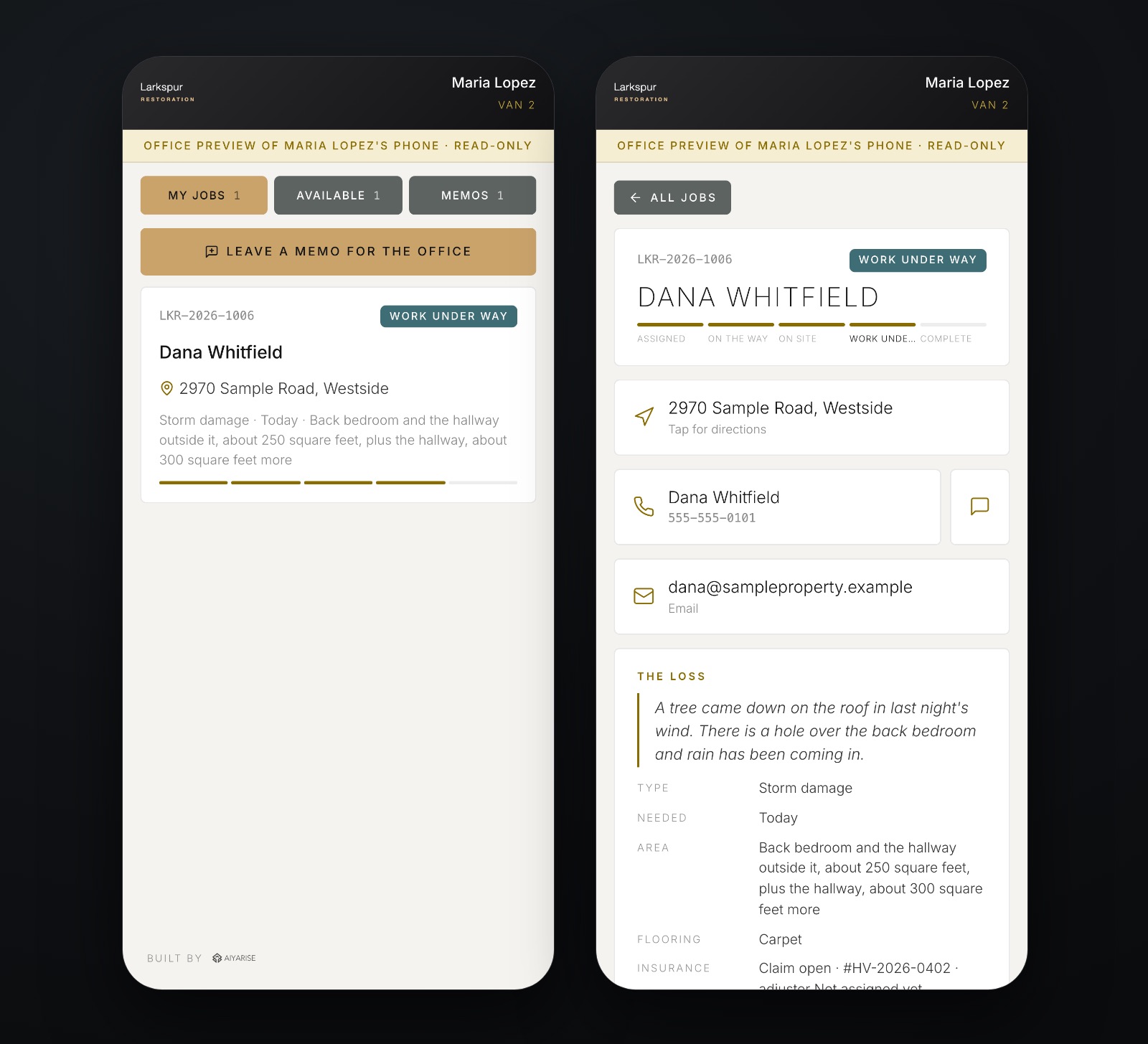
The crew app on two phones: the job list, and one job open with its stages, address, contact and the loss in the caller’s wordsIllustrative · sample data
On the phone

Know before you go

The job, the address and the caller’s own words

  • Contact details: shown only once the job is theirs
  • One tap: directions, a call or a text to the customer
  • On site: hold a button and say what you found
Corrections

Teach it a name once

Every call after listens for it

  • Fixed once, without calling anyone
  • Past calls corrected in place
  • The next call listens for the word
01

Transcribed

Every call is written down

02

Spotted

The office sees a misheard name

03

Taught

One correct spelling, saved

04

Applied

Past transcripts are fixed

The library

Corrections

Spellings the office has taught

Chapter 04

Built to hold up

It knows its limits

  • 01What it never does
  • 02What it always does
  • 03Tested before every change
Governance

It knows its limits

What it never does, and what it always does

Never quotes a price

Pricing stays with the office, always.

Never books a visit

How soon is captured; the office schedules.

Never advises on coverage

Claims and deductibles go to the team.

Says it is automated

Up front, in its first sentence.

Danger means 911

Fire, gas, collapse or injury: call 911.

A person releases every job

Nothing reaches a crew unreviewed.

Dependable

An emergency line cannot have a bad night

Tested before every change, on record after every call

24/7
On the franchise’s existing number

Simple call forwarding; the number customers dial stays the same.

100+
Automated checks on every change

Run before anything reaches a caller.

0
Duplicate jobs from network retries

One call, one saved job.

Status: built and in testing, preparing for go-live. Production figures will follow launch.

Next step

Hear it take a call

A walkthrough of the line, the board and the crew app

Brayden Everton
Founder, President and CEO, Aiyarise Intelligence Inc.
[email protected] · 250.880.9049
202-1007 Fort St, Victoria BC · aiyarise.com

A person decides.

A stair and light well in grayscale